Fleet teams couldn't see what was happening on the road
Operators were juggling phone calls, spreadsheets and separate trackers to answer simple questions: where is the vehicle, who is driving it, and is anything going wrong right now?
No live picture
Vehicle and driver locations were checked one by one, so delays and detours surfaced too late.
Alerts lost in the noise
Speeding, harsh braking and low fuel were reported after the fact, if at all.
Trips without a record
Stops, durations and distances weren't captured, so there was nothing to review or bill against.
Field teams left out
Managers away from a desk had no mobile view of their fleet.
How might we give fleet teams a live, trustworthy view of every vehicle and driver, and tell them the moment something needs attention?Design challenge
Four principles behind every screen
Traxovia had to handle people, vehicles, trips, zones and alerts without feeling like five separate tools.
Location is the starting point
The map is the main canvas. Lists, details and history open on top of it, not instead of it.
Moving, parked or idle
Every asset carries a clear live status, colour and label, so a quick scan tells the story.
Alerts say what happened and where
Speeding, harsh braking and geofence breaches arrive with the driver, asset and time attached.
Web for control, mobile for the field
The same data, status language and actions carry across the dashboard and the app.
See everyone, then zoom into anyone
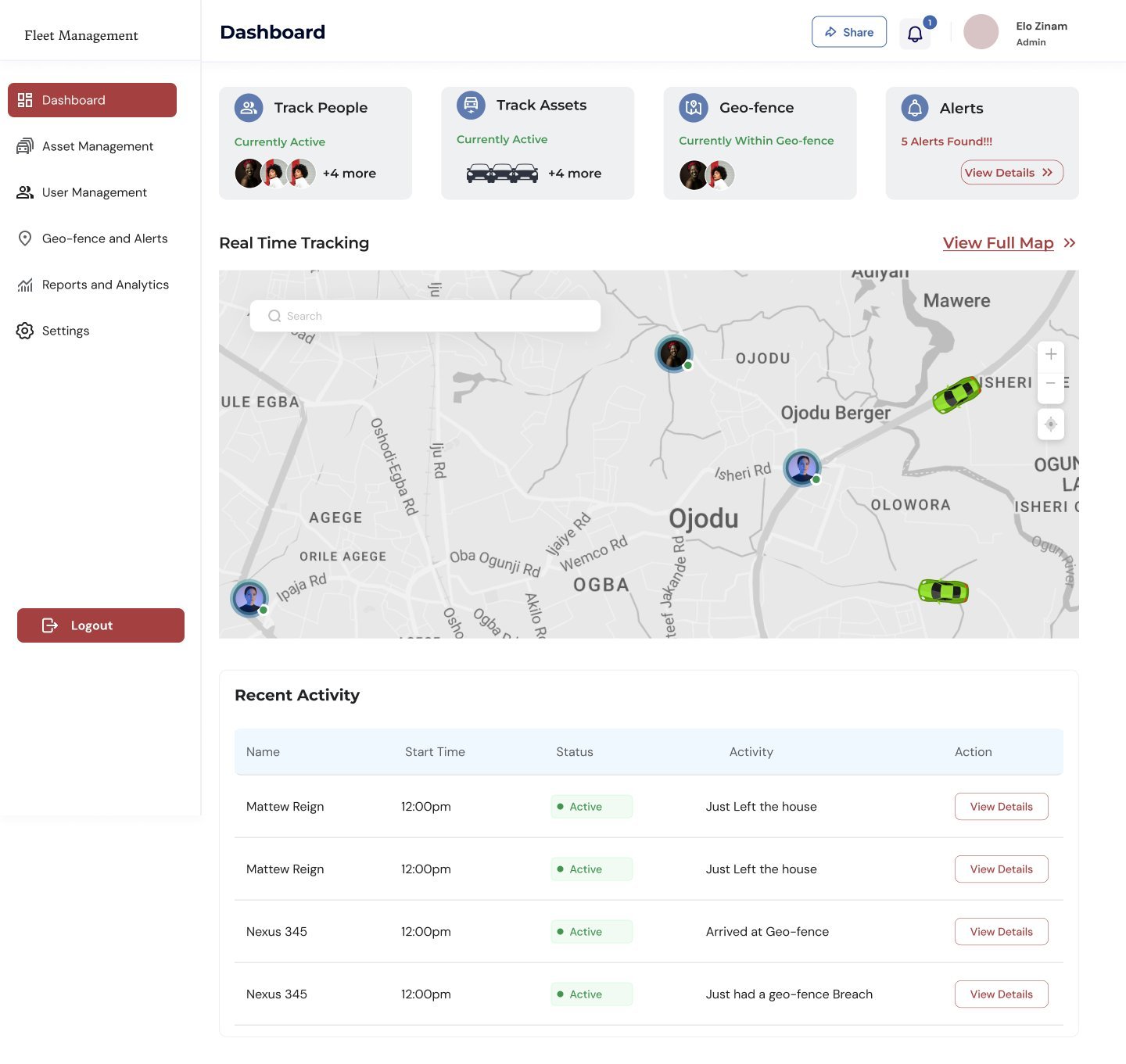
The dashboard opens on quick filters for people, assets, geofences and alerts above a live map. One click opens the full map, and selecting a person or vehicle shows exactly where they are and where they've been.
Fleet map. Every car, truck, bike and person as a live marker.
Four entry points on the dashboard. Track people, track assets, geofence and alerts each show who is active right now, so the first question is answered before any click.
Details on the map, not on a new page. Selecting a person opens a card with battery, contact, current location and last stop, while the route stays visible behind it.
Playback when it matters. "View playback history" and "View route navigation" sit on the same card, ready for incident reviews.
Every trip, stop by stop
Trips are recorded automatically. Managers see totals and trends, then open any trip to replay its route and every stop along the way.
Totals before tables. Total, ongoing, completed and unfinished trips lead the page, with a monthly trip analysis chart.
A timeline of stops. Each trip shows first stop to destination as a timeline under the map, with times and addresses.
Replay a trip
- First stop
- Second stop
- Third stop
- Fourth stop
- Destination
Press play or drag to replay the route.
Draw a zone, get told when it's crossed
Admins define zones such as a warehouse or office, choose which alerts to receive, and see which assets are inside or outside each zone.
Three alert choices. Enter, exit or both, chosen with clear descriptions before the area is drawn on the map.
Inside versus outside. Every zone shows assets within and outside it, with breach counts and a live notification log.
Set an alert, watch it fire
- Alerts will appear here as the truck crosses the zone.
Fleet control in your pocket
- Instant accessibilityManage the whole fleet from anywhere, with the same real-time data as the dashboard.
- Easy setup and onboardingAdd vehicles, assign drivers and start tracking in minutes with guided onboarding.
- Alerts and communicationPush notifications for trip updates, speed warnings and emergencies, so nobody is out of the loop.
- Safety zones on the goSee who is inside a safety zone and get notified the moment someone enters or leaves.
Designed for the field. Built for speed.
Assets, live asset tracking, activity alerts and driver profiles with behaviour scores, all in the app.
Safer drivers, faster responses
Each driver has a profile with a behaviour scorecard, their own geofence settings and full trip history. Every alert lands in one log with the asset, driver and time.
A score you can read in a second. The driver scorecard turns speeding and braking events into one number on a ring.
One place for every alert. Geofence breaches and speed-limit warnings share a single, filterable log with a "View details" on every row.
The business view of the fleet
Admins see fleet size, users, revenue and expenses at a glance, with performance and revenue trends and a breakdown of where money goes.
Expenses broken down. Salaries, fuel, maintenance and other costs are split out in a donut, so the biggest cost is obvious.
One language for web and mobile
Shared colours, statuses and alert patterns make the dashboard and the app feel like the same product.
Colour
Red for actions and alerts, green reserved for live and active states.
Live status
One status language for assets, trips, zones and users.
Alert rows
Severity by colour, always with a time.
Scorecard
Driver behaviour as a single score on a ring.
What shipped
A connected web dashboard and mobile app for tracking people and assets, managing trips and zones, and responding to alerts in real time.
Products in one system: web dashboard and mobile app.
Asset types tracked: all, cars, bikes and trucks.
Geofence alert modes: enter, exit or both.
Web modules, from real-time tracking to subscriptions and settings.
What I learned
Keep the map in view
Opening details on top of the map instead of on new pages kept operators oriented, especially during incidents.
Alerts need context to be useful
An alert only helps when it says which driver, which asset, where and when. Every alert pattern was designed around that.
Web and mobile have different jobs
The dashboard is for control and review, the app is for quick checks in the field. Designing both with one status language made switching seamless.
Scores beat raw data
Turning speeding and braking events into a single driver score made safety conversations faster and fairer.
Want to work together?
Open to projects, collaborations and full-time roles.